
ZAPIER – The Ultimate Automation Tool for Modern Professionals
Imagine this: your alarm goes off, you make your coffee, and by the time you sit down at your desk, your overnight leads are already in your CRM, your social posts have gone out, and your team has been notified about three new customer orders — all without you touching a single button. That’s not a dream. That’s Zapier — and it’s probably the most powerful productivity tool you’re not fully using yet.
In this blog, we’ll cover exactly what Zapier is, how it works, who it’s for, and walk through six real-world examples you can set up today — even if you’ve never written a line of code in your life.
What Is Zapier?
Zapier is a no-code automation platform that connects over 7,000 apps and web services, allowing them to share data and trigger actions without any manual intervention. Founded in 2011, it has grown into one of the most widely used automation tools in the world, trusted by over 2.2 million businesses globally — from solo freelancers to Fortune 500 companies.
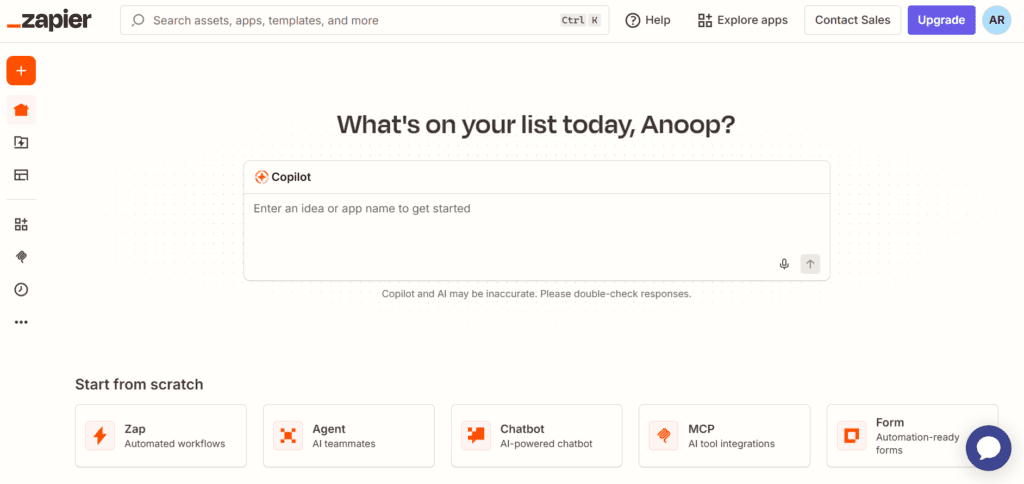
At its core, Zapier works through automated workflows called Zaps. Every Zap has two essential parts:
- Trigger – the event that starts a Zap (e.g., a new email arrives, a form is submitted, a payment is received)
- Action – what happens as a result (e.g., create a spreadsheet row, send a Slack message, add a contact to your CRM)
Once a Zap is live, it runs automatically in the background — 24 hours a day, 7 days a week. You set it up once, and it works for you continuously without any further effort.
How Does Zapier Work?
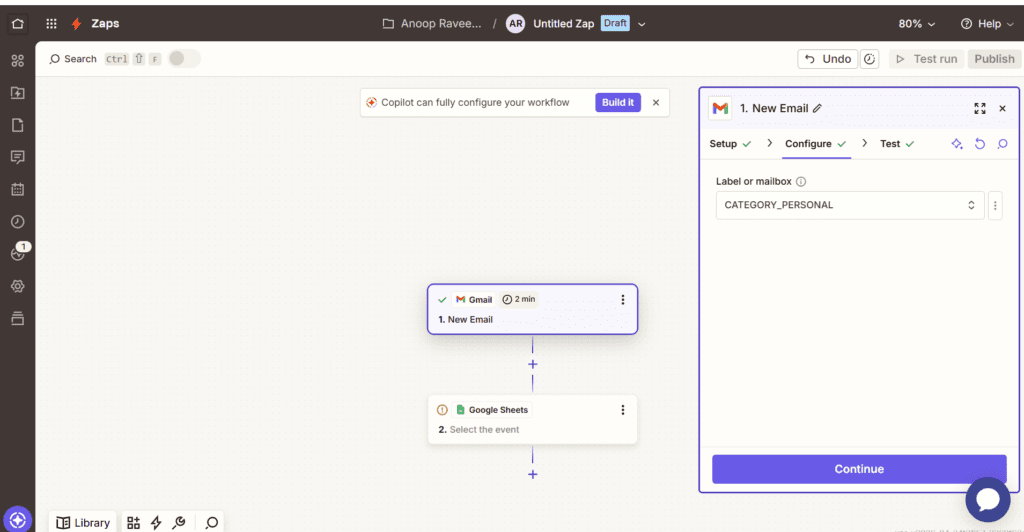
Setting up a Zap takes just a few minutes and requires zero technical knowledge. Here is the basic process:
Step 1 — Choose Your Trigger App
Select the app where the automation should begin. Popular trigger apps include Gmail, Google Forms, Typeform, Shopify, Stripe, and Slack.
Step 2 — Define the Trigger Event
What specific thing should kick off your Zap? A new email received? A new row added to a spreadsheet? A new customer sign-up? You pick the exact event.
Step 3 — Choose Your Action App
Select where Zapier should send data or perform a task — Google Sheets, Notion, HubSpot, Trello, Mailchimp, and thousands more.
Step 4 — Map Your Data
Zapier lets you map fields from the trigger to the action. For example, pull the respondent’s name from a form submission and automatically fill the “Name” field in your CRM. This is where the real power lies.
Step 5 — Test and Activate
Zapier runs a live test so you can verify everything works correctly. Once confirmed, turn it on and your automation is live.
Free plan note: Zapier’s free tier supports up to 100 tasks/month and single-step Zaps. Multi-step Zaps require a paid plan starting at around $19.99/month.
Who Should Use Zapier?
The honest answer? Almost anyone who works digitally. But Zapier delivers the biggest impact for:
- Freelancers and solopreneurs handling client onboarding, invoicing, and communications alone
- Small business owners who need multiple tools to stay in sync without hiring developers
- Marketing teams automating lead capture, email sequences, and social media posting
- Operations and HR teams managing repetitive workflows like approvals, onboarding, and reporting
- E-commerce brands connecting Shopify, email platforms, and fulfillment tools
If you’ve ever thought “I wish this app could just talk to that app” — Zapier is your answer.
6 Real-World Zapier Examples
Let’s get practical. Here are six powerful Zaps with full context and use cases.
| Example 1 | Auto-save Gmail attachments to Google Drive |
| TRIGGER: New email with attachment in Gmail → ACTION: Upload file to Google Drive folder |
| [ Productivity ] If clients regularly send you invoices, contracts, or reports over email, this Zap saves every attachment directly to a designated Google Drive folder the moment it arrives. You can filter by sender or subject line so only relevant emails trigger it. No more manual downloading, renaming, or organizing — your Drive stays clean and current automatically. |
| Example 2 | Add form responses to a Google Sheet instantly |
| TRIGGER: New submission in Typeform or Google Forms → ACTION: Create new row in Google Sheets |
| [ Data Collection ] Running a survey, job application, or feedback form? Every time someone submits a response, Zapier maps each answer to the correct column in your spreadsheet in real time. No manual entry, no delayed exports, no missed responses. Pair it with a second action to also send a confirmation email to the respondent automatically. |
| Example 3 | Get Slack alerts for every new Shopify order |
| TRIGGER: New order placed in Shopify → ACTION: Send message to a Slack channel |
| [ E-Commerce ] For e-commerce teams, this Zap means no one has to sit refreshing the Shopify dashboard. The moment a new order comes in, a Slack message fires to your #orders channel with the customer name, items, and total. You can route high-value orders above a set threshold to a separate #vip-orders channel. The whole team stays informed without switching tools. |
| Example 4 | Auto-publish blog posts to social media |
| TRIGGER: New post published in WordPress → ACTION: Create tweet on Twitter/X + LinkedIn post |
| [ Content Marketing ] Every time you hit publish on your WordPress blog (or Medium, Ghost, or Webflow), Zapier automatically sends a tweet and a LinkedIn post with your article title and link. You can customize the message format — add hashtags, emojis, or a platform-specific call-to-action. Your content distribution runs on autopilot from the moment you publish. |
| Example 5 | Create a Trello card from a starred Gmail |
| TRIGGER: Email starred in Gmail → ACTION: Create new card in Trello board |
| [ Task Management ] Whenever you star an email that requires follow-up or action, Zapier instantly creates a Trello card with the email subject as the card title and the message body as the description — placed directly in your To Do list. Your inbox becomes a task generator with a single click. Zero copy-pasting, zero forgetting, and no context-switching between apps. |
| Example 6 | Add new Stripe customers to Mailchimp automatically |
| TRIGGER: New customer created in Stripe → ACTION: Add or update subscriber in Mailchimp |
| [ Sales & Email Marketing ] When someone makes a purchase and becomes a Stripe customer, this Zap instantly adds them to a Mailchimp audience or a specific tag segment. Your welcome email sequence triggers automatically, your subscriber list stays current, and you begin nurturing customers immediately — without any manual list management. Essential for any SaaS or e-commerce business. |
Zapier vs. the Alternatives
Zapier is not the only automation tool on the market. Here is how it stacks up:
- Make (formerly Integromat) — More powerful visual flow builder, cheaper for high-volume tasks, but steeper learning curve
- n8n — Open-source and self-hostable, great for developers who want full control and data privacy
- Microsoft Power Automate — Best for enterprises already embedded in the Microsoft 365 ecosystem
- IFTTT — Simple and free for basic automations, but far fewer apps and very limited logic
Zapier’s edge is its unmatched app library, beginner-friendly interface, and thousands of pre-built Zap templates. For most non-technical users, that simplicity and breadth are worth the price.
Tips for Getting the Most Out of Zapier
- Start simple: Pick one repetitive task you do every day and automate it first
- Use Zapier’s template library: Thousands of pre-built Zaps mean you rarely need to build from scratch
- Use Filters: Only trigger a Zap when specific conditions are met (e.g., only emails from a certain domain)
- Build multi-step Zaps: One trigger can notify Slack, update a spreadsheet, AND create a task simultaneously
- Monitor your task usage: Each action counts as one task toward your monthly limit
Final Thoughts
Zapier is one of those rare tools that genuinely changes how you work. The hours you spend copy-pasting, manually updating records, and switching between apps are hours you could redirect toward creative, strategic, and high-value work.
The best part? You don’t need to be technical. If you can describe a workflow as “when this happens, do that” — you can build a Zap. Start with one. Automate one annoying task this week. Once you see it running silently in the background, you’ll wonder how you ever managed without it.
Ready to start? Head to zapier.com, sign up for free, and build your first Zap in under five minutes.